You can drop a course at any time before the Add/Drop deadline.
After that deadline, you will have to submit a request here:
For GSP Students: https://lfforms.okwu.edu/Forms/GPS-Add-Drop-Form
For Traditional Student: https://lfforms.okwu.edu/Forms/TRAD-Add-Drop-Form
To Drop A Class:
Log in to MyOKWU at my.okwu.edu.
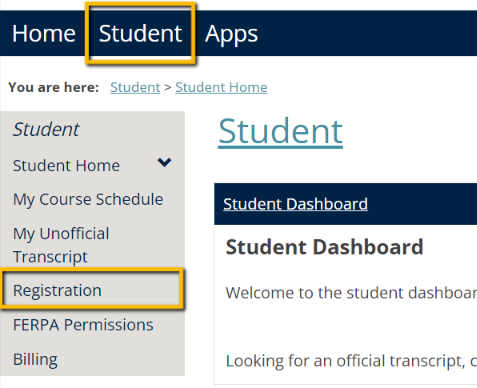
Click on Student in the blue navigation bar at the top, then select Registration in the left-hand menu.
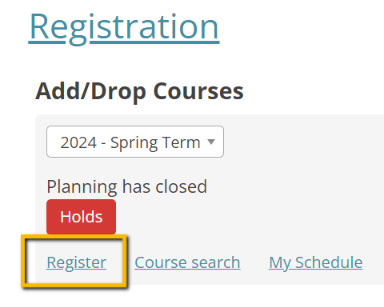
Select Register from the Registration page:
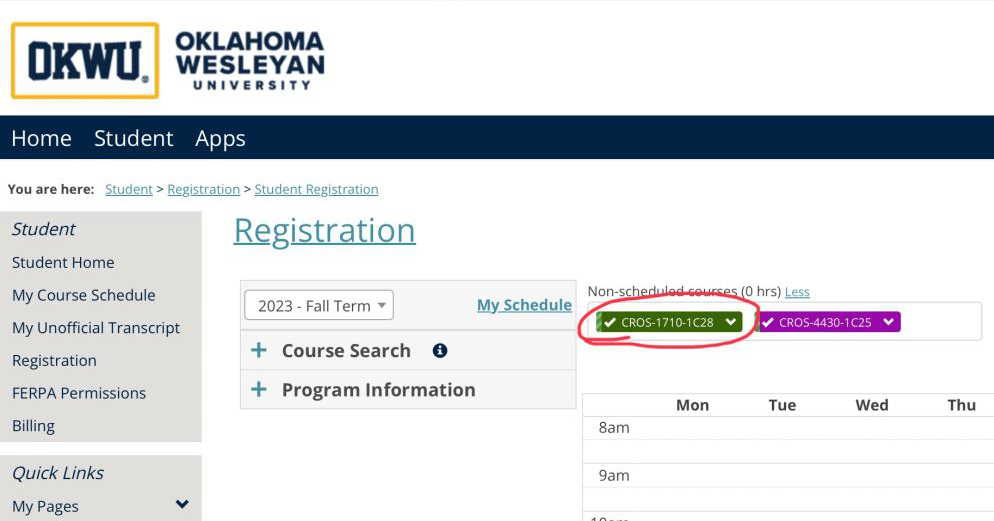
On the Registration page, assuming the current term is selected, you will see all of your courses for the current term. Click the drop-down arrow next to the course you need to drop and select drop.
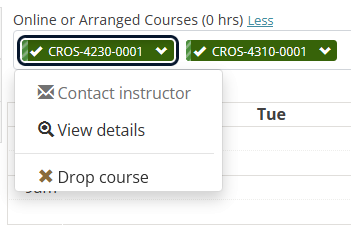
The "Drop course" option should show up at the bottom of the drop-down menu.
Was this article helpful?
That’s Great!
Thank you for your feedback
Sorry! We couldn't be helpful
Thank you for your feedback
Feedback sent
We appreciate your effort and will try to fix the article